

Use the conversation to explain your research task, inspect the evidence, and refine the result. A prompt is the request you type in Ask anything….
Aim for an answer you can trace to its sources and explain to another researcher. A confident summary still needs your review.
Before you begin, open your study project. Follow Add and switch projects if needed, or Start a session for a separate task.
To practise the file and line references on this page, use study-brief.txt from the retail project in Start a session.
Write a clear first request
Give the agent the context a colleague would need before starting the work. Include these details when they matter:
- The question, purpose, and intended audience.
- The source files and the version of each source to use.
- The sample, geography, fieldwork period, and relevant definitions.
- The approach, exclusions, and decisions that need your approval.
- The output format, length, and location, or a request to answer in chat only.
- How to handle missing information, conflicting evidence, and uncertainty.
Start with a concrete research task. This example uses the practice project. For your own study, replace the file paths and topic.
Use Transcripts/ and Research Instruments/interview-guide.md.
Summarize grocery checkout barriers in a theme table with exact quotes, source files, and exceptions.
Answer in chat and keep source files unchanged.
You do not need to put every instruction in one message. Keep lasting requirements in a study brief and name it in your request.
Use short replies to settle missing details. For example, type Keep participant observations separate from your interpretation. Ask me about missing context before drawing conclusions.
Set a word limit or output location when it matters. Check that the agent has understood these choices before approving a larger task.
Read your request before sending it. Wording such as Find evidence that price is the main barrier assumes the conclusion.
A more open request is Compare the barriers mentioned in these interviews, including evidence that price matters less than other factors.
Check existing research first
Look for earlier reports, approved questionnaires, and research notes before requesting another analysis. They may already answer the question or explain a decision.
Use Find and preview project files to find a file by name in the selected project.
Open the relevant files and check their contents. If the earlier study belongs to another project, follow Add and switch projects.
Ask the agent to identify what can be reused and what needs fresh work. For example, type Read these previous reports. List relevant findings, their limits, and unanswered questions before proposing new analysis.
Point to the right source files
Reference a whole project file
-
Type
@and part of the filename in Ask anything…. For the retail checkout study, type@study.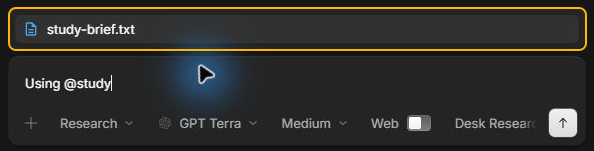
-
Select
study-brief.txtfrom the suggestions. The filename appears in your message as a reference. -
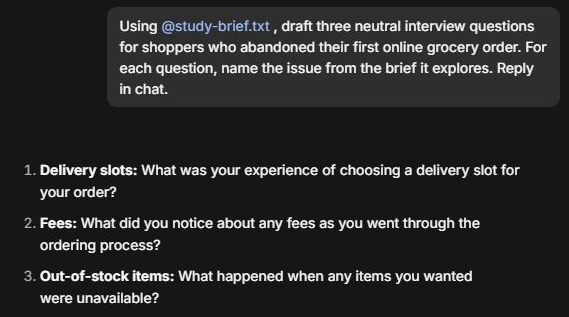
Tell the agent what to do with the file. For example, ask for three neutral interview questions for shoppers who abandoned their first grocery order online. Ask the agent to name the issue from the brief that each question explores.
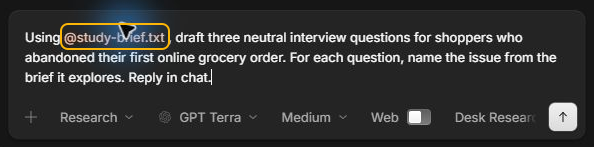
-
Select the send arrow and check the reply against the brief. The questions may be worded differently each time. Check that each question addresses an issue in the brief without assuming what the shopper experienced.
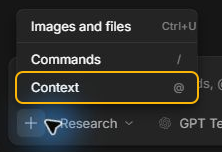
You can also select the plus button in the request box, then select Context. Type part of the filename and choose the matching file.
Follow Find and preview project files to check the file before you refer to it. If two copies have similar names, open each one and confirm which version your study uses.
Reference a specific line
Use a line reference when you want the agent to focus on one passage, such as the objective in a study brief.
-
Open the file in InsightGig and select the line number next to the passage. In
study-brief.txt, line 5 starts withA national grocery retailerand describes what the study should find out.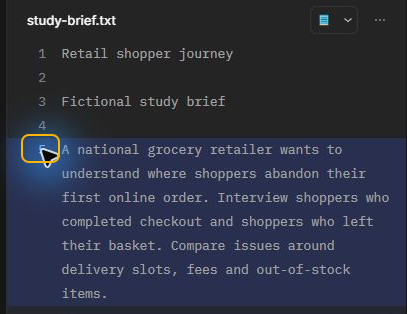
-
Press
Ctrl+Shift+L. A card in the request box shows the filename and line number.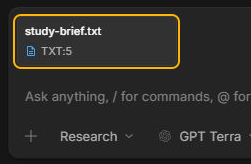
-
Add your question and select the send arrow.
Use the card’s Remove attachment button if you need to replace the selection before sending.
If your source is an interview recording, follow Transcribe interview recordings to prepare and check the transcript before analysis.
Before combining a dataset with a report, state how to handle disagreements. For example, type If the deck and dataset disagree, show both values and their sources. Ask me which to use.
Carry the study context into the chat
The files may not explain why a question changed, why a record was excluded, or which population a finding describes. Include those decisions explicitly.
| Context to provide | What the agent needs to know |
|---|---|
| Sample and method | Who took part, how they were recruited, and whether the evidence comes from interviews, a survey, or another method. |
| Definitions | What a segment, measure, category, or theme means in this study. |
| Data preparation | Filters, weights, excluded records, missing-value rules, and the base for percentages. |
| Versions | The dataset, questionnaire, codebook, or report version approved for this task. |
| Use restrictions | The approved purpose, information to exclude, and details that must stay out of outputs. |
Ask the agent to identify gaps before analysis. For example, type List the context missing from these files. Ask before choosing a weighting rule or interpreting an undefined segment.
Keep a study brief you can reference again
Record lasting rules in an approved study brief. Include segment definitions, approved weighting rules, source locations, and reporting language when they matter.
Reference the brief at the start of a new conversation. Name the decision or requirement that applies to the current task.
Keep detailed decisions, changing hypotheses, and individual findings in research notes. Update the brief when the study requirements change.
Check whether findings can be compared
Ask the agent to compare study definitions before combining results. Differences between waves or markets can reflect changes in questions, samples, or methods.
For example, type Before comparing these waves, list changes in wording, answer options, sample, weights, and fieldwork. Flag comparisons that need my review.
Keep measures such as aided and unaided awareness separate. Ask for each measure’s question wording and base before accepting a comparison or average.
Keep qualitative observations separate from survey estimates. A small interview study can illustrate experiences without establishing how common they are in the wider market.
Use Analyze qualitative data for a starting request covering themes, participant identifiers, source excerpts, and exceptions.
If you change the prompt, model, or analysis approach for a repeated study, check the output against reviewed examples. Record the change before interpreting a trend.
Follow Choose a model and thinking level when deciding which settings to use for that task.
Ask for evidence you can inspect
Ask for enough detail to check the result against the source. Useful requests include:
- Exact quotes with source filenames and participant identifiers, where appropriate.
- The question, table, worksheet, or passage supporting a finding.
- Counts, percentage bases, filters, weights, and calculation steps for numerical results.
- Assumptions, missing evidence, and reasons a conclusion remains uncertain.
For each important finding, ask for the study, sample, method, source version, and supporting passage or calculation. This keeps the context attached when findings are reused.
Open cited passages and compare them with the originals. Read the surrounding text to see whether it supports the interpretation.
For calculations, request the inputs and method so you can reproduce the result. A written explanation alone does not prove the calculation is correct.
Follow Analyze survey data for bases, weights, and missing-value instructions. Use Create a spreadsheet to check that a workbook’s formulas agree with the survey counts.
Ask the agent to label generated examples or hypothetical responses. Do not present them as collected participant evidence or include them in observed sample counts.
Challenge the answer with focused follow-ups
Name the part that needs attention and the check you want. You can revise a section without asking for the entire answer again.
| When you notice | Follow-up request |
|---|---|
| A broad claim | Which sources support this? State the sample and limits of the claim. |
| A theme that looks too uniform | Find cases that contradict this theme and explain how they affect the interpretation. |
| A disputed number | Show the source, base, filters, weights, and calculation for this figure. |
| An unsupported conclusion | Separate observed evidence, interpretation, and hypotheses. Mark anything the sources cannot establish. |
| A citation that does not support the text | Recheck this claim against the original source. Correct or remove it if the evidence is insufficient. |
Avoid repeating a request until it produces the conclusion you hoped for. Compare the evidence behind different answers and investigate why they disagree.
If the agent cannot substantiate a claim, keep the gap visible. Asking for more confident language does not make the evidence stronger.
Agree on checkpoints for larger tasks
For work with several stages, use Plan to clarify the sources, method, and outputs before execution. Follow Plan and run a task for the complete process.
State where you want to review the work. For example, type Read the brief and propose an analysis outline. List assumptions and planned output files. Wait for my approval before starting the analysis.
Review the plan and answer unresolved questions before approving it. Review permissions separately using Review requests for approval.
For public-source work, follow Choose Web or Desk Research. Check source dates, definitions, and links before using external claims.
Save the decisions behind the result
Ask for a short research note alongside important outputs. Record the sources used, the instructions, methodological decisions, unresolved issues, and what you reviewed.
For example, request this after reviewing an analysis. Replace the location with your own output folder:
Save a research note in Analysis and Reporting/research-note.md.
Record our sources, agreed method, decisions, corrections, and approved output.
Separate completed checks from unresolved gaps.
A useful note includes source versions, filters, weights, exclusions, and assumptions where relevant. Review these details in the saved note and request corrections.
A .md file is a text document with headings and formatting. Open the saved note and confirm it accurately records your decisions.
For repeat work, keep a reviewed copy of the prompt and record changes to it. Note the selected model and thinking level when they matter for comparison.
When starting a new conversation, cite the research note and the relevant sources. Do not assume that decisions from an earlier conversation are available in the new one.
Bookmark reviewed project versions
Follow Set up project history so InsightGig can save versions of your study files. In Keep a history of this project, select Include my current files to record your starting files.
Save another version after a useful milestone, such as reviewing a questionnaire or accepting a corrected report.
In Research, type /save Reviewed theme table and research note and send it. Replace the description with the milestone you want to recognize later.
The save request covers file changes from the current conversation. The agent should ask before including unrelated changes. Wait for confirmation of what was saved.
If you need an earlier version later, ask the agent to find the relevant saved milestone. Review which files would change before agreeing to restore them.
History stays on your device. Keep separate backups of important research files. A saved version records files; include your research note to preserve the decisions behind them.
Follow Recover file changes to undo an editing request and check the file before continuing.
Request an evaluation before sharing
Use Eval to check an output against the brief and source material. Follow Choose an agent mode for switching and handoffs.
Name the output, sources, and checks you need. For example, type Evaluate this theme table against the transcripts. Check every quote, participant identifier, and claimed exception. Report unsupported interpretations.
The evaluation produces EVALUATION.md, a findings report. Verification work stays in its evaluation area; this mode reports problems without editing the reviewed output.
Review the findings and ask Research to apply the corrections you accept. Request another evaluation if the changes affect important claims or calculations.
Evaluation provides another check by an agent. Agreement between agents does not establish accuracy or replace your review of evidence and research decisions.
Review before sharing
Wait for the task to finish, then open the saved outputs. Check these points before sharing them:
- The answer addresses the agreed question and audience.
- Quotes and figures match the sources and their context.
- Comparisons use compatible definitions, periods, and bases.
- Conclusions reflect the sample and evidence, with uncertainty visible.
- Private details and material outside the approved purpose are excluded.
- The research note distinguishes your approval from work that still needs review.
You should have a result you can trace to the evidence and a record of the decisions behind it. Continue in the same conversation for focused corrections.
Next steps
Use Plan and run a task for a staged assignment. Use Start a session when the next task needs a separate conversation.