

Use Desk Research to build an evidence-based understanding of a market from public sources. Start with a market question and finish with report content, source records, and documented limitations.
This workflow uses a packaged savoury snacks example. See Choose Web or Desk Research for the current switches and when to use them.
Here, focus on the research decisions: what to include, how to judge the evidence, and when the content is ready for reporting.
Before you begin
Open a session in a project with a connected account. Follow Set up a broader investigation to select Research and turn on Desk Research.
Public sources, follow-up questions, and findings can differ between runs. Check your own report against the brief and open the sources behind its main claims.
Follow Check credits and usage to see your balance. If this is your first research request, try Send your first request before starting a larger run.
Use Web for a focused fact check or source lookup. Desk Research suits a broader market overview that needs source comparison and report preparation.
Allow time for both the research run and the independent verification that follows. Starting a run uses your connected account; review the agent’s explanation before confirming.
Prepare the market brief
-
In Ask anything…, describe the market you want to understand and the output you need.
The example asks about packaged savoury snacks in India. It covers size, growth, categories, consumer preferences, prices, channels, trends, and challenges.
Ask for reliable public sources, links, dates, differences between estimates, and evidence gaps. Adapt this request to your study.
Prepare a brief for desk research on packaged savoury snacks in India.
Cover market size, growth, consumer preferences, pricing, and retail channels.
Use public sources with links and dates. Flag conflicting estimates and missing evidence.
Wait for my approval before starting the research run.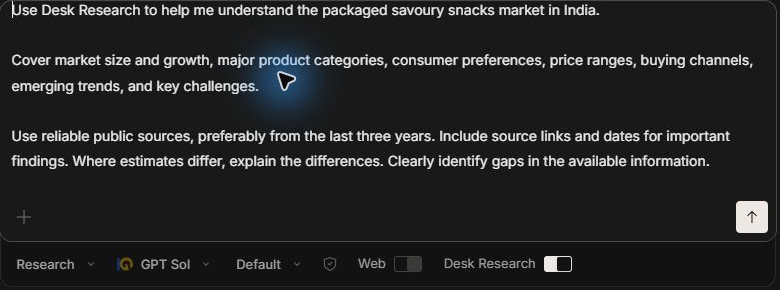
-
Open the saved research brief and check the market boundaries before approving it.
A broad category name can hide different definitions. For example, all snacks, savoury snacks, and packaged savoury snacks can describe different markets.
Check these details in the brief:
Detail What to settle Purpose What readers should understand after reading the overview. Geography The country or regions covered, with relevant differences kept separate. Category Products included, adjacent categories, and exclusions. Evidence period The preferred source period and how older background material is labelled. Coverage The questions and comparisons the report must address. Output The summary, analytical sections, tables, references, and limitations needed. Ask for changes in the conversation if the brief expands or misunderstands your question. Review the updated brief before proceeding.
For example, reply
Keep the scope to packaged savoury snacks. Prefer sources from the last three years and show dates for important findings.
-
Confirm the reviewed brief and approve starting the usage-billed run in the conversation.
The agent can ask separately for brief approval and start confirmation. Answer each request after reviewing what it covers.
Keep the approved scope specific enough to judge the result later. Turning on the Desk Research switch alone does not start a run.

You should see Desk Research activity for the submitted run. You can minimize the app or use another conversation while it works; keep InsightGig open.
Follow the evidence checks
The initial research draft starts the review process. The agent then checks important claims independently, using further searches and source content.
The example checklist separates the initial audit, independent verification, writing the source records, and requesting report approval.

Wait for the completion message that covers research and source checks. The first Desk Research activity ending does not mean the report is ready for approval.
Review and approve the report
-
In the completion message, open the draft, source ledger, and verification notes.
The source ledger records sources, supported claims, and verification status. Verification notes explain corrections, exclusions, and unresolved gaps.
Look for links to those three items in your reply. Their labels can vary. If any are missing, ask the agent where it saved them.
These companion files let you review the evidence behind the report. In this example, they have the following names:
File Use it to check 01-kickoff-prompt.mdThe approved research scope and evidence requirements. 02-raw-desk-research.mdThe initial research draft before independent verification. 03-source-ledger.mdSource details, dates, access limitations, and verification status. 04-verification-notes.mdFindings that were strengthened, corrected, excluded, or left unresolved. 05-final-report-content.mdThe report content awaiting your review. These are Markdown files, which store readable text with headings and tables. Open the conversation’s file links to read them in Preview.

-
Read the verification notes and inspect the sources behind important findings.
Check whether the evidence matches the market definition and measured period. Separate observed figures from forecasts and broader category figures from your specific market.
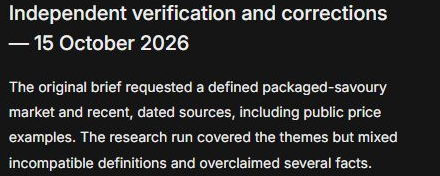
In this example, verification identifies incompatible market boundaries and a growth comparison that includes a projected period. The report keeps those limitations visible.
An inaccessible source or an unsupported estimate needs a clear caveat or further checking. More citations do not guarantee stronger evidence.
-
Review the report draft against your original brief and request any corrections.
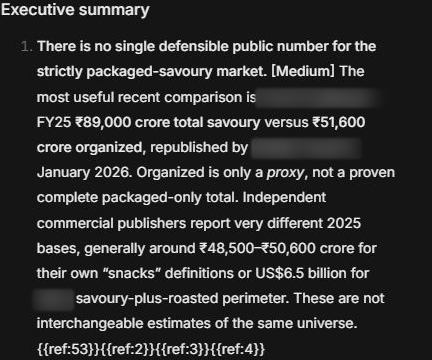
Check that each requested topic has an answer or a stated evidence gap. Read confidence labels, source dates, definitions, and caveats alongside the headline findings.
The example uses Medium confidence labels. Read their supporting evidence and limitations; a label alone does not establish reliability.
A marker such as
{{ref:53}}points to reference 53 in that draft. Use the number shown beside your claim to find the matching entry in References. Open that source and compare it with the claim.Ask for a targeted revision in the same conversation. For example, type
Separate forecasts from observed figures in the market-size table and explain the remaining gaps.Continue from the saved research for follow-up checks. A new research run is a separate request with fresh usage approval.
-
Approve the content and give an exact page target when you want the agent to prepare a Word report.
Say whether the target is strict or a layout preference. For example, reply
I approve the content. Prepare an eight-page Word report, with eight pages as a layout target.The example ends at this approval request. The completed research draft is not a finished Word document.

You should have reviewed report content supported by source records and verification notes. Keep these together so you can trace findings and explain their limitations.
Check the requested Word output
Content approval is the handover to document preparation. Wait for its completion message before treating the Word report as delivered.
When the agent provides a .docx link, open it in Preview. Follow Find and preview project files to find the saved document in Windows or open it in Word.
Compare the document with the approved content. Check its tables, source links, references, page target, and limitations after formatting.
Ask for corrections in the same conversation if material is missing or changed. Keep the approved content and source records beside the Word file.
The screenshots show the saved research content and the request for Word approval. They do not show a completed Word report from this run.
Next steps
Continue in the same conversation for revisions or narrower questions about the market. After Word preparation, review the document’s tables, references, and caveats before sharing it.
Follow Check credits and usage to review recorded service costs. Return to the setup guide for the research switches and activity labels.