

InsightGig is a desktop app for market research. Connect a study folder and ask an agent to work with your interviews, transcripts, survey data, or public sources.
Use the app to transcribe audio and video interviews, analyze responses, or gather evidence from websites and public social media. You can turn checked findings into a report, a spreadsheet, or a PowerPoint presentation.
Follow a study from question to result
Suppose a grocery retailer wants to know where shoppers stop during their first online order. Open a folder with the brief, shopper interviews, and survey responses. Start by asking which parts of the checkout deserve a closer look.
Use the interviews to understand how shoppers describe those moments. Use the survey to check how frequently respondents reported a specific experience, such as seeing a delivery fee. Public sources can help you put the findings in context.
Keep each finding connected to its source. A transcript can support a quote about one shopper’s experience. A survey result needs a clear question and the number of answers used to calculate it.
See how the agents work together
An agent is the assistant that carries out your request. Choose a mode for the role you need. Use Plan to agree on the work, Research to do it, and Eval to check the output.
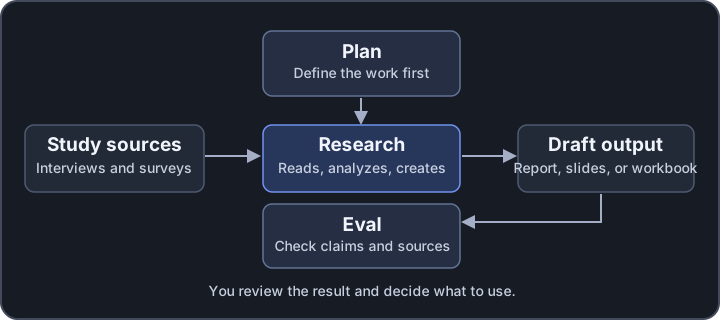
For a defined task, start in Research. For example, ask for interview questions from an approved brief. For a wider assignment, agree on the sources, methods, and output in Plan first.
For the checkout study, ask Plan which files and groups it will compare. After reviewing the plan, ask Research to draft themes and a survey table. Use Eval to check whether the quotes and calculations agree with those sources.
Review the checks yourself before sharing the result. If a fee percentage uses the wrong number of answers, ask Research to correct the table and recheck that figure against the survey.
Keep the work with your study
A project connects the app to a study folder. A session is a saved conversation in that project. Open a session again to find the request, activity, and result. See Understand projects and sessions.
The desktop app is where you work with study files and talk to the agents. The Console is the website you use to manage your account and pay for usage. See Find your way around the Console.
Get started
Follow Create your account, then Install InsightGig and Sign in to the desktop app. Use Send your first request to analyze a five-person practice focus group.