

Create a theme note for a fictional national grocery retailer. The study explores where shoppers leave their first online order. Allow about 15 minutes to open the files, run the analysis, and check its evidence.
Before you begin
Download the retail checkout practice files. In File Explorer, right-click the download and select Extract All. Name the extracted folder Retail checkout study. The interviews and survey responses are fictional.
Sign in to the desktop app and Check credits and usage before starting.
The sample includes a brief, an interview guide, three shopper transcripts, and one store-team transcript. If you start with recordings, follow Transcribe interview recordings and check the Word transcripts first.
Part 1 Open the study sources
- Add the
Retail checkout studyfolder you extracted in Before you begin. Use Add and switch projects if you need the steps. - Start a session in Retail checkout study. Select Open project files and check
study-brief.txt, the guide in Research Instruments, and both folders in Transcripts.
You should see separate Shoppers and Store teams folders. Keep them separate when you report what each group can tell you.
Part 2 Ask for a theme note
-
In the session you opened in Part 1, select Research and send this request.
Read study-brief.txt, Research Instruments/interview-guide.md, and the files under Transcripts. Separate shopper accounts from store-team observations. Give each theme an exact quote, a source filename, and an exception if you find one. Save Analysis and Reporting/checkout-themes.md and link it in the reply. -
Open
checkout-themes.mdfrom the reply. If the file is missing, ask Research to create theAnalysis and Reportingfolder and save the note there.
Part 3 Verify a finding
Theme names and quotes can vary. Use the slot-screen example to practise checking a source, then apply the same check to a claim in your own note.
-
Open
checkout-themes.md, the note you saved in Part 2. Choose a finding with a quote and a source transcript. The screenshot shows a finding about the delivery-slot screen.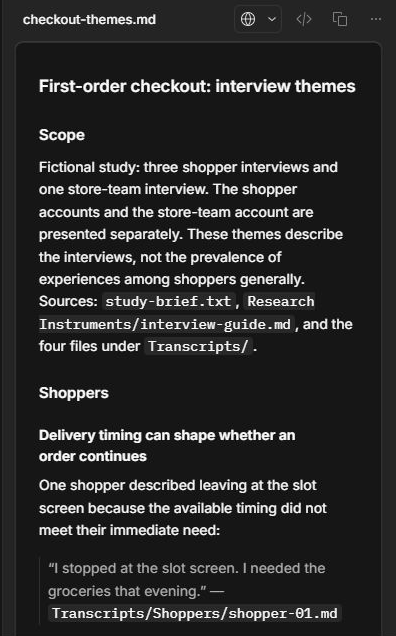
-
Open the transcript named beside your quote and check the words and speaker. Read the moderator’s question for context. The screenshot’s slot-screen quote comes from
Transcripts/Shoppers/shopper-01.md. -
Look for an account that qualifies the finding. For the slot-screen example,
Transcripts/Shoppers/shopper-03.mddescribes a shopper who chose a slot and completed the order. Check whether the note reflects both experiences and states what this small study can show.
You should have a checked note with evidence from both groups and a record of any gaps. Ask Research for a targeted correction if a claim goes beyond its source.
Part 4 Prepare a report
Continue in the same Research session. Use the theme note you checked in Part 3 to draft a report for the research team.
Draft a short interview report using Analysis and Reporting/checkout-themes.md.
Include an opening summary, source quotes, study limits, and questions for further interviews.
Link the draft and wait for my approval before creating the Word report.
Compare the draft with the theme note. Check that it includes the study’s scope and evidence limits. Then use Analyze qualitative data to approve the draft and open the finished Word report.
Next steps
Follow Complete a quantitative study to check the survey in the same project. Use Synthesize research findings to bring both methods together. Use Evaluate research outputs before sharing.