

Use Inbox to keep track of sessions across projects. For example, check whether the agent has finished drafting interview questions while you work on a separate survey.
To follow along, open Retail checkout study using Start a session. Turn on Inbox before sending the practice request.
Turn on Inbox
-
In InsightGig, go to Home > Settings > Preferences.
-
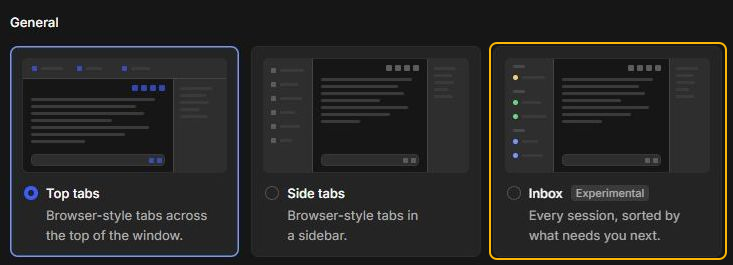
Under General, select Inbox. The card is marked Experimental.
-
Select Back to app. The Inbox sidebar appears on the left.
If you prefer tabs, return to Preferences and select Top tabs or Side tabs.
Respond when a session needs you
To practise with a question, start a session in Retail checkout study. Send Before drafting the retail interview guide, ask me which checkout topic to focus on first. Wait for my answer.
The wording and answer choices can vary. If the agent asks in a normal reply, open the conversation and answer there.
-
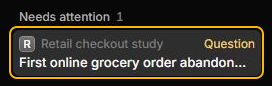
Under Needs attention, select a session marked Question or Approval. Check the project name above the session title before opening it.
-
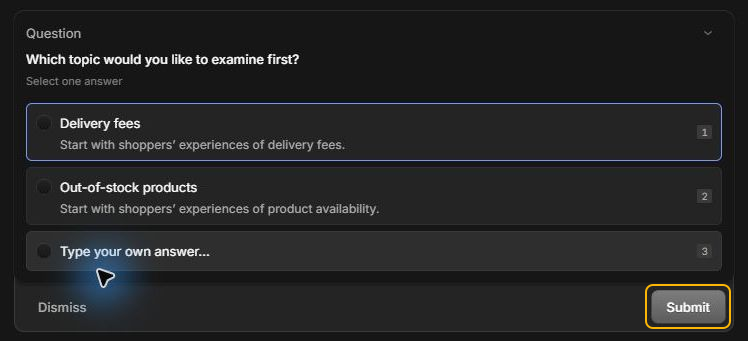
Read what the agent is asking for. For a question, select an answer and select Submit. For an approval, review the requested action before you decide.
Check progress and open a reply
-
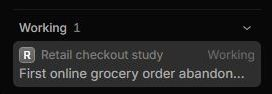
Look under Working at the bottom of the sidebar for requests still running. Select a session there to see its progress.
-
If a request finishes while you’re away, look for Done and select the session to read its reply. A request marked Failed also needs review. Open it to see what happened.
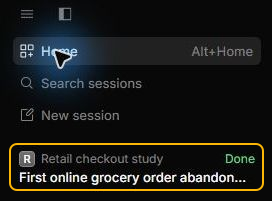
Select Search sessions above the list if the session you want isn’t visible. For more ways to look up earlier work, see Find and reopen sessions.
To clear completed work from your active list, learn how to archive a finished session.